Setting up a Aspire Solution
There are multiple ways we can setup a new Aspire project. We can setup a new one from scratch, or use the Visual Studio/CLI to add aspire to an existing project.
For demo purposes we will create a new project from scratch, but you can find the tutorial for adding aspire to an existing project here.
Environment Setup
Workload
For dotnet 8, you will need to install a dotnet workload.
You can see your existing workloads dotnet workload list and
install the aspire workload with dotnet workload install aspire.
For Mac/Linux you need to run these commands with sudo.
After installation you should see a list like this after running
dotnet workload list.
Installed Workload Id Manifest Version Installation Source---------------------------------------------------------------------aspire 8.2.0/8.0.100 SDK 8.0.100maui 8.0.72/8.0.100 SDK 8.0.100If you want to upgrade to .NET 9 and remove the workload you can
run dotnet workload uninstall aspire.
Docker
An OCI compliant container runtime is required, I use Docker although there is support for Podman. If you want to use Podman instead of Docker you can check out the Microsoft documentation here. All resources that are not .NET Projects are run in containers.
IDE
- Visual Studio 2022 includes .NET Aspire templates, and additional context menu options specific to Aspire.
- Jet Brains Rider now has Aspire support bundled and does not require installation of an additional plugin.
- Visual Studio Code has the C# Dev Kit: Extension, which should have LSP support for Aspire, although templates and other features are done through the CLI.
Because I use Rider, I will include screenshots for UI setup as well as the CLI.
Creating a project
Templates
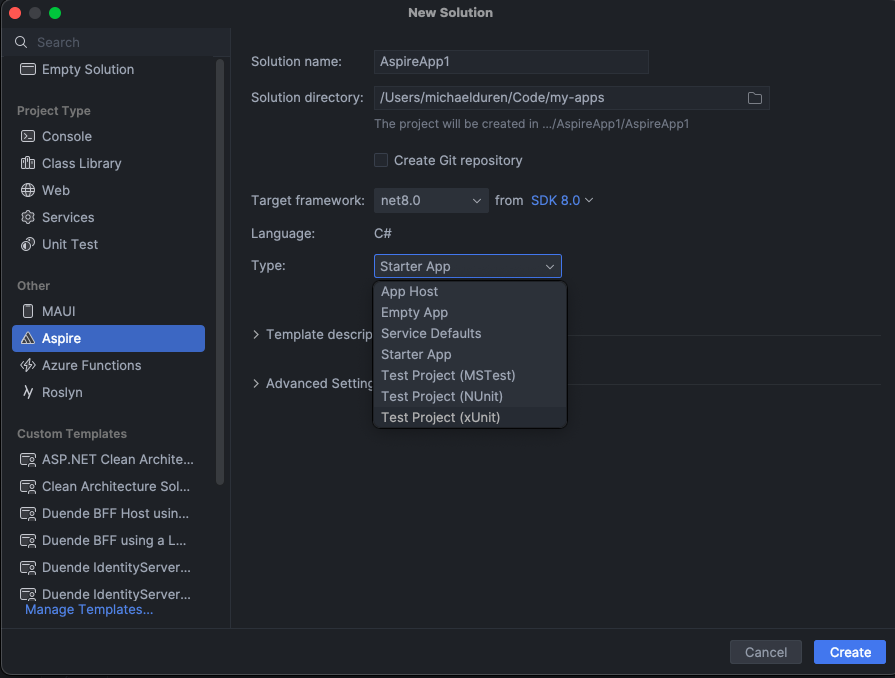
.NET Aspire provides two projects: AppHost and the ServiceDefaults
projects. The templates give you the following options:
-
Starter App- Creates a solution with the two projects that also contains example frontend and backend projects. -
Empty App- Just contains the two projects. -
App Host&Service Defaults- Individual aspire projects.
If we run dotnet workload list | grep aspire we can see the
same projects as the image above.
.NET Aspire App Host aspire-apphost [C#].NET Aspire Empty App aspire [C#].NET Aspire Service Defaults aspire-servicedefaults [C#].NET Aspire Starter App aspire-starter [C#].NET Aspire Test Project (MSTest) aspire-mstest [C#].NET Aspire Test Project (NUnit) aspire-nunit [C#].NET Aspire Test Project (xUnit) aspire-xunit [C#]We’ll pick the starter app with the name Walkthrough and click Create
or run:
dotnet new aspire-starter -n Walkthrough -o ./Walkthrough